


Ableton Live 12 New Features

Ableton recently announced that the next major update for its much loved Live software is due to land early 2024, so we thought it was the right time to have a look and see what the Ableton 12 new features are, and give you a preview of what to expect.
We’ve made a few videos on the new features already - check the video below out before continuing on..
In this article
- Playful additions
- New sounds
- Work more intuitively
- When is it out?
- You can watch our videos about the new features of Ableton Live 12
Playful additions
First up let’s look at some of the main features of the Ableton 12 update.
Midi transformations and generators

One of the most interesting additions in the Ableton 12 update is the MIDI transformations and generators. The generators allow you to set parameters and let Live generate melodies, chord sequences and rhythms for you, that you can then develop into your own tracks.
Midi editor improvements
Live’s MIDI capabilities have always been strong, but with the latest Ableton live update they are taking it to the next level. MIDI notes can now be chopped into parts with the click of a mouse, or alternatively, you can now select numerous notes and join them together. The note utilities panel has had a major overhaul too, with additional features for this Ableton 12 update.

Keys and scales
One of the most exciting of Ableton 12’s new features is the Scale Awareness tool. In earlier versions you could select keys for individual MIDI clips but scale awareness brings the ability to select a global key centre for your session, which automatically sets the key centre across all MIDI clips plus a number of instruments and MIDI devices.
Tuning systems
If you’ve always wanted to dive into the world of alternative and micro tunings, then the best of Ableton live 12’s new features for you is the new Tunings section in the browser window. This features a wide range of different tunings that can be applied to MIDI clips. Get ready for things to get wonky!
New sounds
Amongst Ableton 12’s new features are a couple of new sound packs to get your teeth into. Let’s dive into the two packs to see what you get.
Meld

Of all of the new features in Ableton 12 this is the one that everyone’s talking about, Meld, Ableton’s latest addition to its already stacked synth offering. Meld is an MPE enabled synth that won’t overwhelm users with a million different controls, but at the same time doesn’t skim on its ability to be programmed and tweaked in limitless ways, allowing you to create leads, pads, beats and FX in an instant.
Check out the video below where Sonic tutor P-Lask gets his hands on the Live Beta and takes a tour through Meld’s capabilities. It’s definitely one of the most talked about of Ableton 12’s new features.
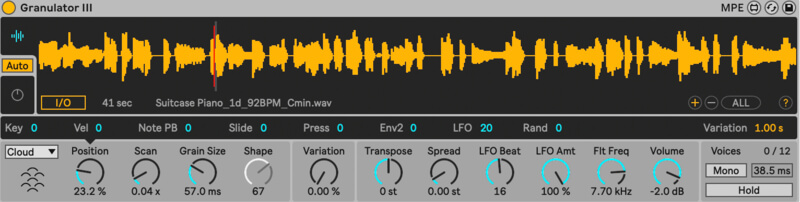
Granulator III
Robert Henke’s groundbreaking Granular gets a serious upgrade with Ableton’s latest update. It now features expression control, allowing you to bend notes and add glissando and vibrato effects to those notes. Ableton have also added the ability to capture real time audio and start manipulating that sound instantly, making this one of new features in Ableton 12 that were most excited to get our hands on.
Roar
This Ableton 12 update brings a brand new addition to the audio effects rack, saturation and coloring device Roar. The device has three different saturation stages, allowing for everything from some subtle warmth right through to huge face melting distortion.
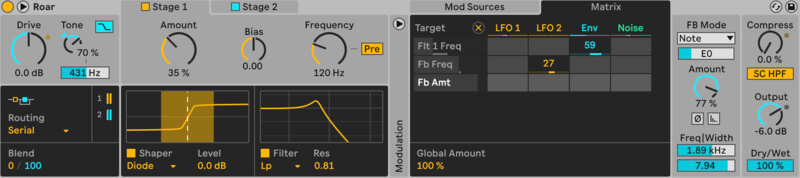
New modulation behavior
Ableton’s latest update also brings a new way to look at modulation. Adjusting a parameter after the addition of an LFO or another modulation source, is now a reality, creating even more modulation possibilities. This is going to amp up your workflow and increase your ability to improvise and create on the fly while performing live.

New packs
Looking for brand new innovative sound, then Ableton live 12’s new features include two massive new sound packs, Lost & Found and Performance Pack.
Lost & Found is perfect for those looking to incorporate unusual real world found sound style elements to your track. The include a number of drum racks and FX that bring foley sound recordings into the mix, allowing you to create some weird and wonderful layers for your tracks.
Live’s new Performance Pack is a game changer for those you use Live to perform. You can now layer up many different macros for advanced control while you perform as well as taking snapshots of your session that you can drop in at any stage, and create pre-planned set structures for you to improvise on top of.
Work more intuitively
Intuitive workflows have been one of Live’s key features over the last decade, but Ableton’s new update takes this to the next level. Here are the features in the Ableton 12 update, that are going to kick start your creativity.
Stacked detail views
Having to switch between clip and device view is a thing of the past, as stacking allows you to view all these parameters at the same time.
View styling
Ableton’s user interface has got a brand new face lift, clearing out clutter allowing you to focus on creativity.
Mixer improvements
The mixer gets a visual upgrade too, making it easier to fine tune those mix choices and mix in arrangement view.
Browser tagging
One of Ableton 12’s new features is the ability to edit and create your own tags and tagging systems, making it easier to find the right sounds instantly.
Sound similarity search
Another key Ableton 12 update is its ability to search for similar sounds or instantly replace sounds for similar alternatives. Watch your workflow go through the roof with this one.
Accessibility and navigation improvements
The last of the new Ableton 12 update features is its brand new suite of keyboard shortcuts, allowing shortcut control of almost every function in Live.
When is it out?
Ableton have been a bit vague on this one, saying that Ableton Live 12 will drop in “early 2024”. The Beta has been out for a while, so many producers out there have had a sneak peek into what’s to come, allowing them to dive into the new tools and Ableton’s hidden features, but an actual release date for Ableton’s new update is currently being kept under wraps. As with any beta release, they will be waiting on feedback from users on Ableton live 12’s new features, and iron out any bugs, before they drop the release to the general public.
You can watch our videos about the new features of Ableton Live 12
Of course we’ve had a sneak peek at all of Ableton 12’s new features, and have some videos up on the site for you to check out. Ace producer and Sonic tutor, P-Lask has dropped two videos looking at his favorite features in the new Ableton 12 update. You can check out the videos below.
Ableton 12 Update - Scale Awareness and MIDI Tools
Ableton 12 Update - Meld Synth
Check an eye on our socials for further news on the Ableton 12 update, as we’ll be dropping some brand new content as soon as it launches, and as always we’ll be on the hunt for any Ableton Live hidden features, tucked away secrets or production hacks to speed up your workflow in Ableton Live 12 when we find them.


